Type the coefficients and this program factors any polynomial into a product like (x−3)(x−2). Works for quadratics, cubics, quartics, and beyond.
By CalcPlex.
Send it to your calculator
Nothing listed in the connect popup: the calculator has to be plugged in and switched on to appear. Wake it up, check the USB cable (charge-only cables won't work), or move to a different port. Close any other tab that's using the calculator.
Open it on the calculator
- Press the
prgmkey. The PROGRAMMING menu opens.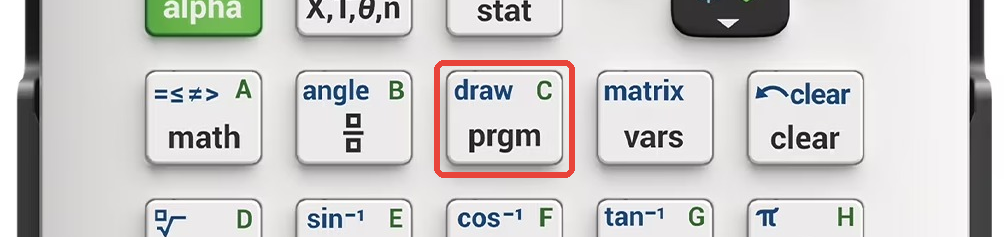
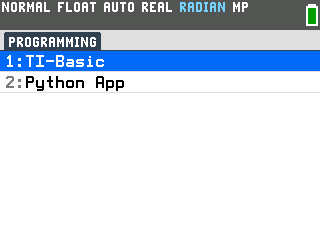
- Press
enterto select TI-Basic. The list of TI-Basic programs opens.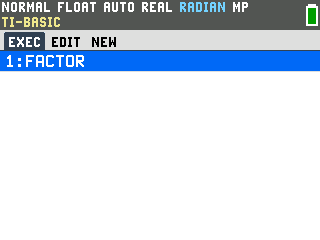
- Press
enteron FACTOR in the program list, which puts prgmFACTOR on the home screen. - Press
enterto run it. The program asks Highest power: first.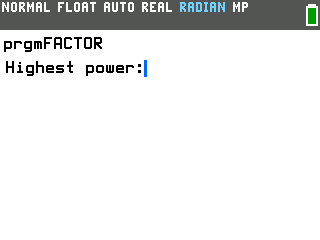
Factor a polynomial
- Type the highest power and press
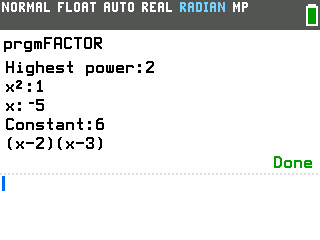
enter. For a quadratic like x² − 5x + 6, that's 2. - Type each coefficient, pressing
enterafter it. The program asks from the highest power down to the constant: x²:, x:, then Constant:. For x² − 5x + 6, type 1, then −5, then 6. The moment you enter the last number, it prints the factored form: (x−2)(x−3).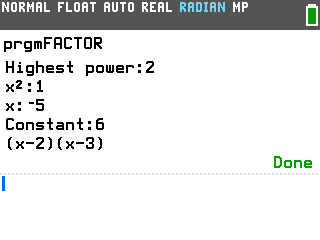
- Press
enteron the home screen to factor another one. The calculator reruns the program and the prompt comes right back.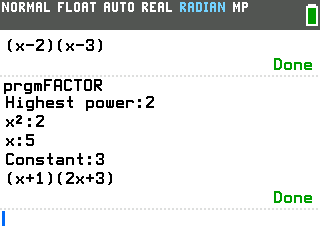
Higher-degree polynomials
The program handles cubics, quartics, and higher the same way. Enter the highest power, then type each coefficient. For x³ − 6x² + 11x − 6, enter 3, then 1, −6, 11, −6.
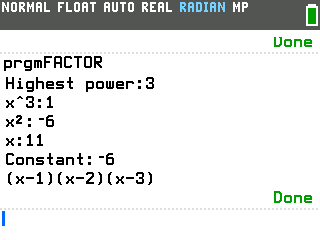
It finds all the rational roots and prints the factored form. If part of the polynomial can't be factored further with integers, it prints that piece as-is.
Good to know
- Leading coefficients and shared factors show up naturally. 2x² + 5x + 3 factors to (x+1)(2x+3), and when there's a common factor it appears as a multiplier: 2x² + 4x + 2 becomes 2(x+1)(x+1).
- Not every polynomial factors over the integers. When a quadratic has
irrational roots (like x² − 2), the program says "Not factorable" and shows the
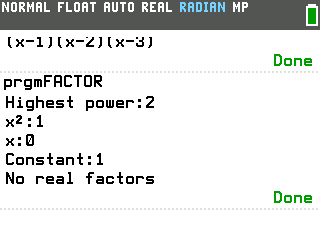
decimal roots instead. When there are no real roots at all (like x² + 1), it says
"No real factors".