CalcPlex CAS is a computer algebra system for the TI-84 Evo. It solves equations and inequalities, factors, simplifies, and takes derivatives, with exact answers: fractions stay fractions and square roots stay square roots. For a lot of algebra problems it also shows the steps.
Install it
Once it's on the calculator: press prgm, choose
Python App, pick CAS in the list, then choose
RUN. Type an expression and pick an action with the five keys under the
screen.
No Python App on your calculator? Here's how to reinstall it.
What it does
It's made for Algebra 1 and 2, with the trig, logs and complex numbers from Precalculus, plus derivatives.
- Solve: linear, quadratic and polynomial equations, plus rational, radical, absolute value, exponential, log and trig equations. A root that doesn't check shows in grey with the reason, and a quadratic with no real roots gives the complex ones.
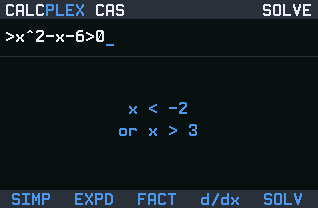
- Inequalities: x² − x − 6 > 0 gives x < −2 or x > 3.
- Systems: put a comma between the equations, like 2x+y=7, x−y=2.
- Formulas: solve v² = u² + 2ad for any letter. It asks which one you want.
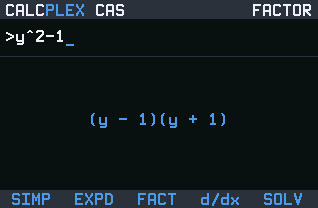
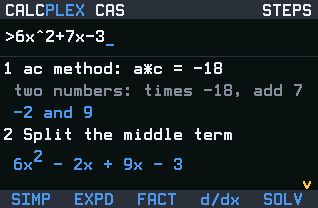
- Factor and expand: 6x² + 7x − 3 becomes (2x + 3)(3x − 1).
- Simplify: fractions, radicals, rational expressions (combined into one fraction), complex numbers with i, and trig values and identities like sec(x)² − tan(x)² = 1.
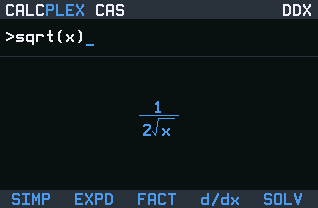
- Derivatives: d/dx of sin(x²) is 2x·cos(x²). Press d/dx again for the next derivative. An equation in x and y gives dy/dx. For the slope at one point without a program, see how to find a derivative on the TI-84 Evo.
Answers are drawn like real math: stacked fractions, radical signs, raised exponents.
See the steps
When an answer has ENTER: steps under it, press enter to see how
it got there. The arrow keys scroll a long list, and clear goes back to the
answer.
Steps come with factoring and with linear, quadratic, polynomial, rational, radical and absolute value equations, and with solving a formula for one letter. Answers without that line, like inequalities, systems and derivatives, don't have steps.
Keys
- The five keys under the screen pick what to do: SIMP, EXPD, FACT, d/dx, SOLV.
sto→types=. Pressenteron an equation to solve it.2ndmathlists < > ≤ ≥ ≠. Press the number of the one you want.alphaand a key types its letter, for variables like y.2nd÷is π,2nd.is i, and2ndlnis e^(.- The
◀ ▶key switches an answer between exact and decimal. - Arrow keys scroll a big answer, and
2ndwith left or right pans one that's too wide. varsshows a key guide inside the program.clearon an empty line quits.
What it won't do
- No integrals, limits or series.
- No matrices.
- It won't rewrite identities like sin(2x) = 2sin(x)cos(x).
- When an equation has no clean exact answer, it says can't solve exactly instead of guessing. Inequalities with square roots, logs or trig get the same answer.
- A power whose answer would run to thousands of digits stays written as a power instead of freezing the calculator.
Heads up for test day: CAS tools aren't allowed on the SAT or the ACT, and other tests have their own calculator rules, so check yours before you bring this along. To take it off, plug in and press Delete on this page. You can send it again afterwards.
Found a wrong answer? Email contact@calcplex.com with what you typed and what it showed.
Nothing listed in the connect popup: the calculator has to be plugged in and switched on to appear. Wake it up, check the USB cable (charge-only cables won't work), or move to a different port. Close any other tab that's using the calculator.