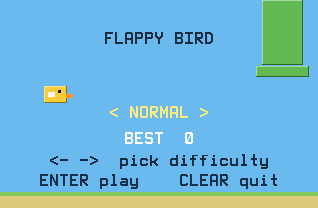
Flappy Bird on a graphing calculator, running smoothly. One key flaps, gravity does the rest, and the pipes keep coming until you clip one.
Nothing listed in the connect popup: the calculator has to be plugged in and switched on to appear. Wake it up, check the USB cable (charge-only cables won't work), or move to a different port. Close any other tab that's using the calculator.
Have a TI-84 Plus CE? Get Flappy Bird for the CE.
By CalcPlex.
Controls
- ENTER or the up arrow flaps. That's the whole control scheme, which is exactly why it's so hard to stop playing.
- Left / right arrows on the home screen pick NORMAL, FAST or INSANE, and ENTER starts.
- CLEAR in the middle of a run goes back to the home screen. Press it there to quit.
- After a crash, ENTER goes again and CLEAR goes back to the home screen.
Three speeds
The home screen offers NORMAL, FAST, and INSANE. Each speed keeps its own high score, so a lucky run on NORMAL doesn't inflate your INSANE record.
When you crash, the screen freezes on the moment of impact and shows your score over it.