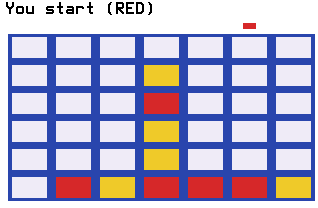
Connect Four for the Evo, playable two ways: against the built-in AI on three levels or pass-and-play against the person next to you. Drop your discs, build threats in two directions at once, and get four in a row first.
Nothing listed in the connect popup: the calculator has to be plugged in and switched on to appear. Wake it up, check the USB cable (charge-only cables won't work), or move to a different port. Close any other tab that's using the calculator.
By CalcPlex.
Controls
- Left / right arrows slide your disc over a column. They wrap around the edges.
- ENTER drops the disc down the column. The down arrow drops it too. A full column ignores the drop.
- CLEAR leaves the game and goes back to the title screen. Against the calculator, leaving after your first disc counts as a loss.
- On the title screen, the left or right arrow picks EASY, MEDIUM, HARD or 2 PLAYERS, the up or down arrow opens How to Play, ENTER starts, and CLEAR quits. It opens on the last mode you picked.
- When a game ends, the winning four blinks and stays marked. Press any key for the result screen, or CLEAR for the title screen. On the result screen, ENTER plays again and CLEAR goes back to the title screen.
Against the calculator
The AI takes a winning move when it has one, blocks yours when it must, never drops a disc that lets you win on top of it, and sets up two threats at once when it can. HARD plays that way every move. MEDIUM and EASY sometimes drop a disc in a random column instead, EASY much more often, so EASY is beatable without a plan and HARD takes a real one.
Your record against each level (wins, losses, draws) is stored on the calculator, and the two of you alternate who moves first each game.
Against a friend
Pick 2 PLAYERS on the title screen with the left and right arrows. Red and yellow alternate turns, and the aim marker above the board changes color so there's never confusion about whose move it is.